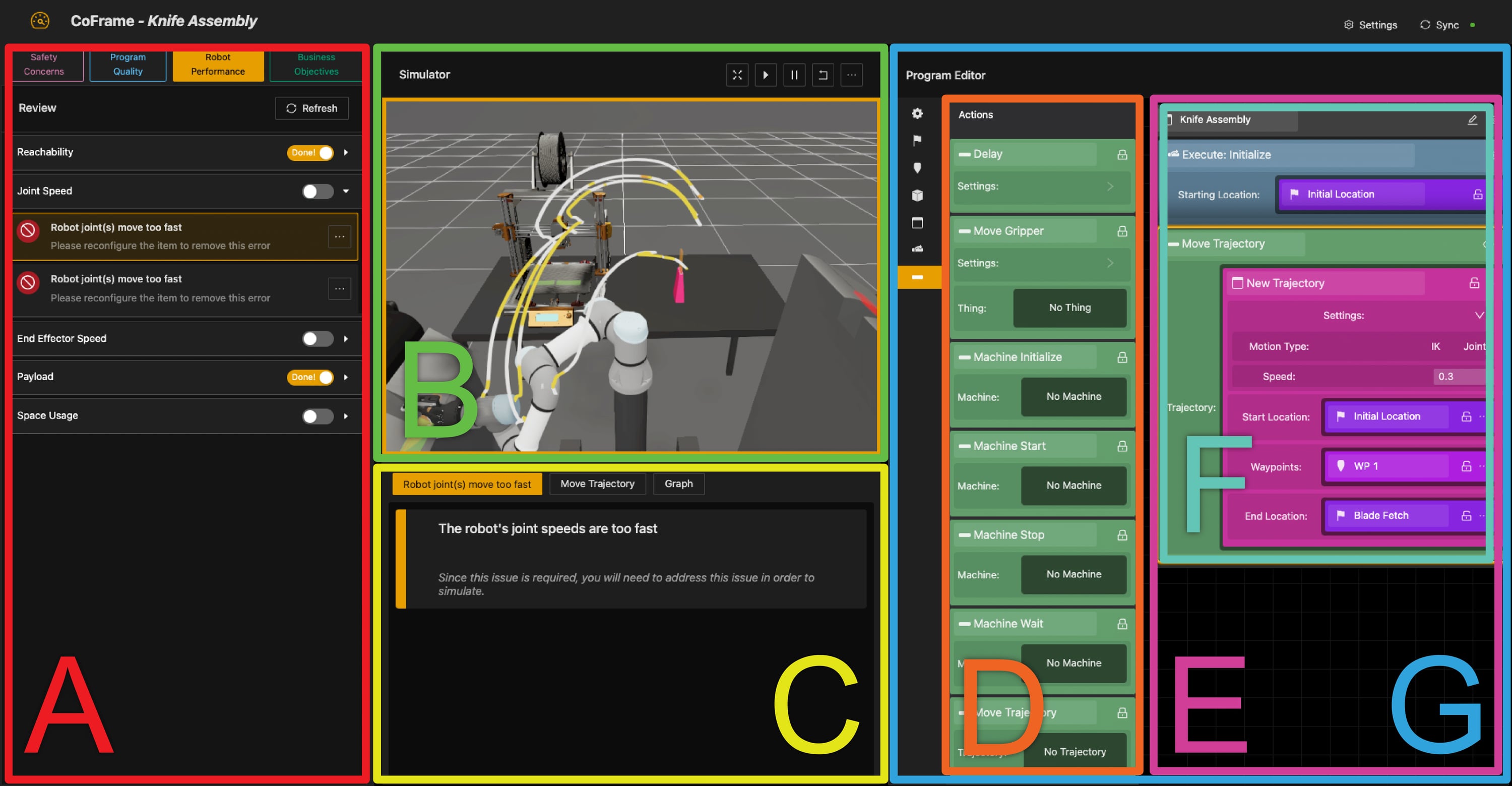
CoFrame is a training environment for novice cobot operators to learn how to safely modify their existing cobot program with proper scaffolding to guide them toward expert-acceptable solutions. We built CoFrame because operators traditionally have little autonomy to modify these systems themselves; automated expert feedback lets them make changes while holding to the safety and quality standards stakeholders demand. Our expert feedback comes in four "frames": safety, code quality, robot performance, and business objectives.
Regarding the technical implementation there is already a good writeup within the repository README here. Also check out the current live demo application here. Lastly, our paper can be found here.
Within this page, I will discuss the project in timeline fashion, starting with before my involvement, then my role, and lastly the hand-off and subsequent publication.
Ethnography
Before my involvement on this project, my advisor and two colleagues from education sciences performed an ethnography on collaborative robots in the workspace. They interviewed managers, engineers, operators, and instructors of collaborative robots with the goal of understanding how these systems are being used and the current challenges with adopting them in industry.
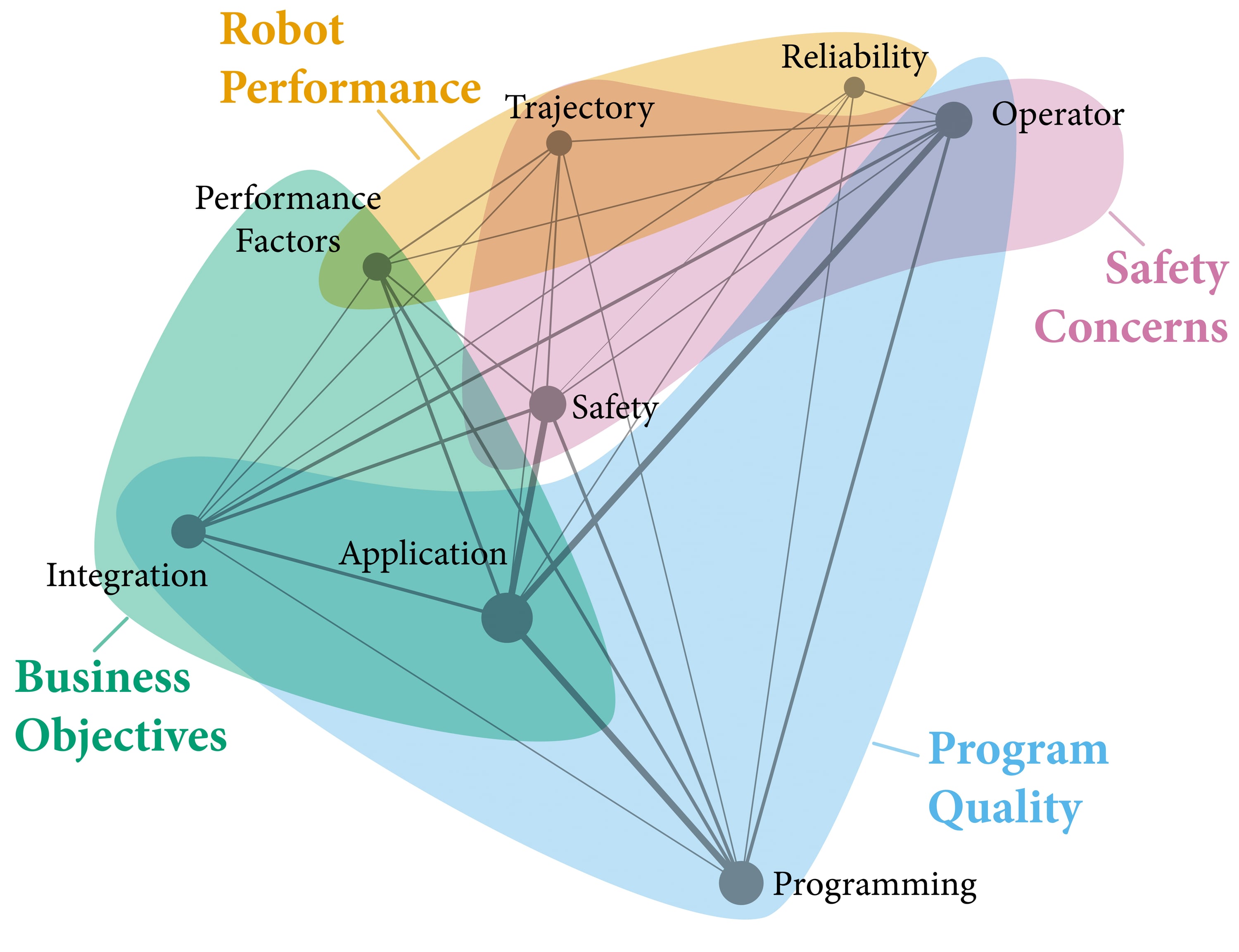
Two papers resulted from this ethnographic work. One focused on high-level needs for cobots, operator trust, and autonomy that targeted practitioners. Two of my other projects, Authr and pRAD, draw inspiration from this work. The second paper performed an epistemic network analysis (ENA) to identify key concepts within the transcript useful in driving future educational material. This work became the inspiration for the CoFrame system.
Contribution
I have broken my contribution down first by conceptual versus technical and then the technical by major subsystem.
Conceptual
Frame Isolation
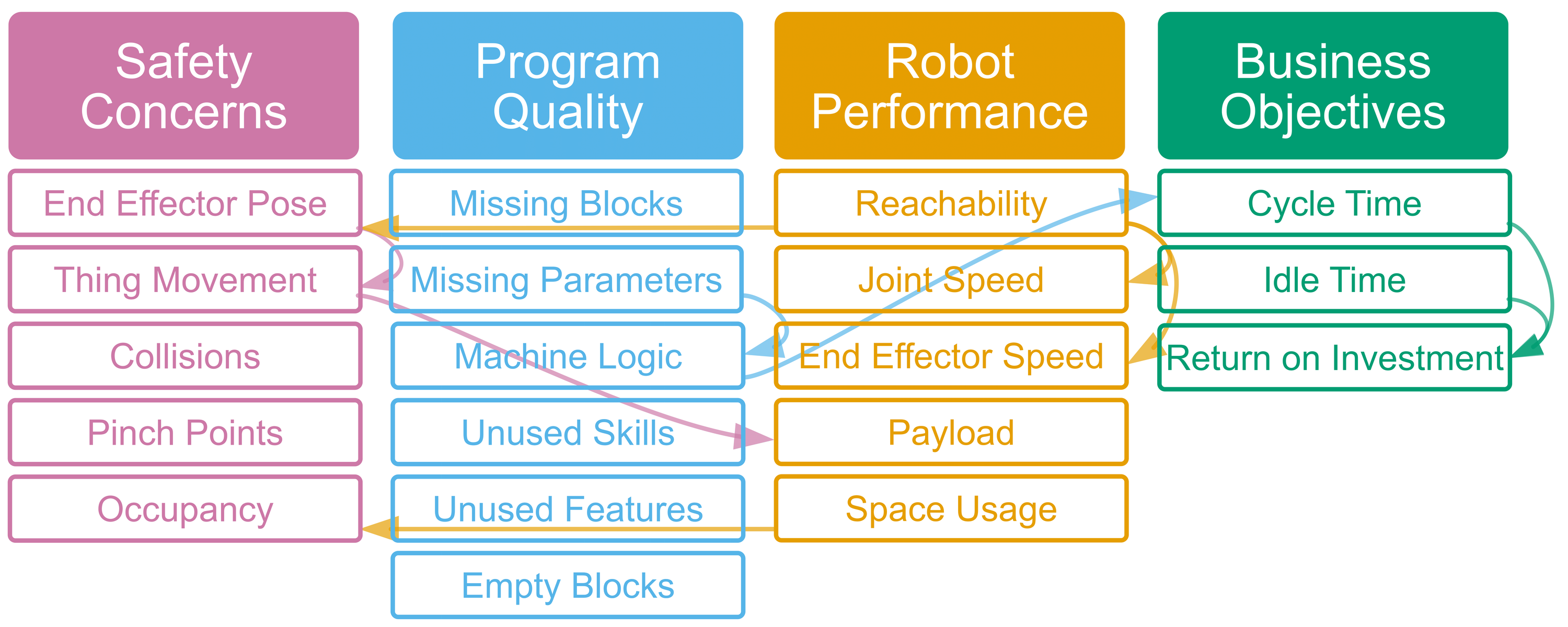
The first critical task for CoFrame was to operationalize expert feedback to the operators. In the ethnography, we found a "safety first" approach, i.e., engineers stressed the safety of the overall application. This became our first frame (or lens) to view the existing program. Through a similar process we found code quality, robot performance, and business objectives. These frames don't isolate underlying concepts, e.g., trajectories are not merely robot performance, rather each frame provides a perspective to think about a particular concept.
From these frames and concepts generated by ENA of our ethnography transcripts, it was possible to build a sort of skill tree that an operator should progress through when updating a cobot program.
The other critical conceptual task was deciding on a salient application. Our ethnography focused on several application domains, with varying levels of successful deployment. It became clear that machine tending was the highest value add for low AI systems.
Cobot machine tending is typically done as a retrofit on an existing manual process of monitoring an industrial tool (e.g., CNC mill), feeding the tool with stock, and/or processing the output. Minimal user interaction is expected within the task itself, though by its nature of being a cobot the robot is not caged off, and thus humans could enter into the workspace.
My first attempt at capturing the machine tending task was to simulate a virtual CNC lathe environment. However, after feedback I switched to an easier-to-understand 3D printer tending task. The final version (as shown in the demo application) takes it a step further and performs tending of an input feeder, 3D printer tending, assembly, and output feeder operation.
Technical
ROS Backend
I designed the backend to be fairly robust. At its core, it is composed of a program server, expert feedback services, and a simulation service. Underpinning this system is ROS (1). A more detailed technical discussion is in the repository.
The program is modeled in a custom programming language called EvDScript (standing for Expert View Dashboard Script). I defined this language with low-level robot primitives analogous to those available in Universal Robots Polyscope software. Additionally, I defined first-class data structures for Things, Machines, Zones, Pinch-points, Trajectories, Waypoints, etc. This language has heritage from my Authr project.
Expert feedback was performed through ROS services that computed data such as reach feasibility (i.e., is a waypoint reachable), trajectory feasibility, zone proximity, object collision, and pinch-point analysis. I used a mix of Lively-TK inverse kinematics (a real-time optimization-based inverse kinematics solver) and pyBullet simulation.
Hololens
Early in the interface design process I wanted to explore augmented reality as a means of situating the user within the application workspace. This would also afford an overlay of expert feedback directly onto the operator's environment (ideally providing a good linkage between the theory and application).
I built the first CoFrame UI prototype within Unity targeting Microsoft Hololens. This prototype explored trajectory visualization, waypoint programming, menu / control operation, and programming.
My first important finding was that visual programming in augmented reality was rather tricky. Both with a custom visual programming environment as blocks in AR and as a 2D slate displaying Blockly. Blockly is a visual programming language developed by Google, which uses a drag-and-drop snap-in system. Furthermore, the limited field of view offered by Hololens meant that having the program open would obstruct any feedback tied to the physical environment.
This resulted in a pivot from a purely AR approach to AR+Tablet system. The goal was to keep trajectory visualization, waypoint programming, and in situ expert feedback on Hololens but leave robot programming / trajectory programming to the tablet (using Blockly). This tablet interface was built as a React web app with Microsoft Fluent framework.
The next pivot to this design happened due to COVID-19. As the world went into lock-down it became clear that a user study with a wearable AR system and tablet was not feasible within the lab. Even under normal circumstances, sanitizing wearable devices (e.g., heart rate monitors) was an additional challenge in performing laboratory studies. So I pivoted from AR+Tablet to a web only app.
Web App Version One
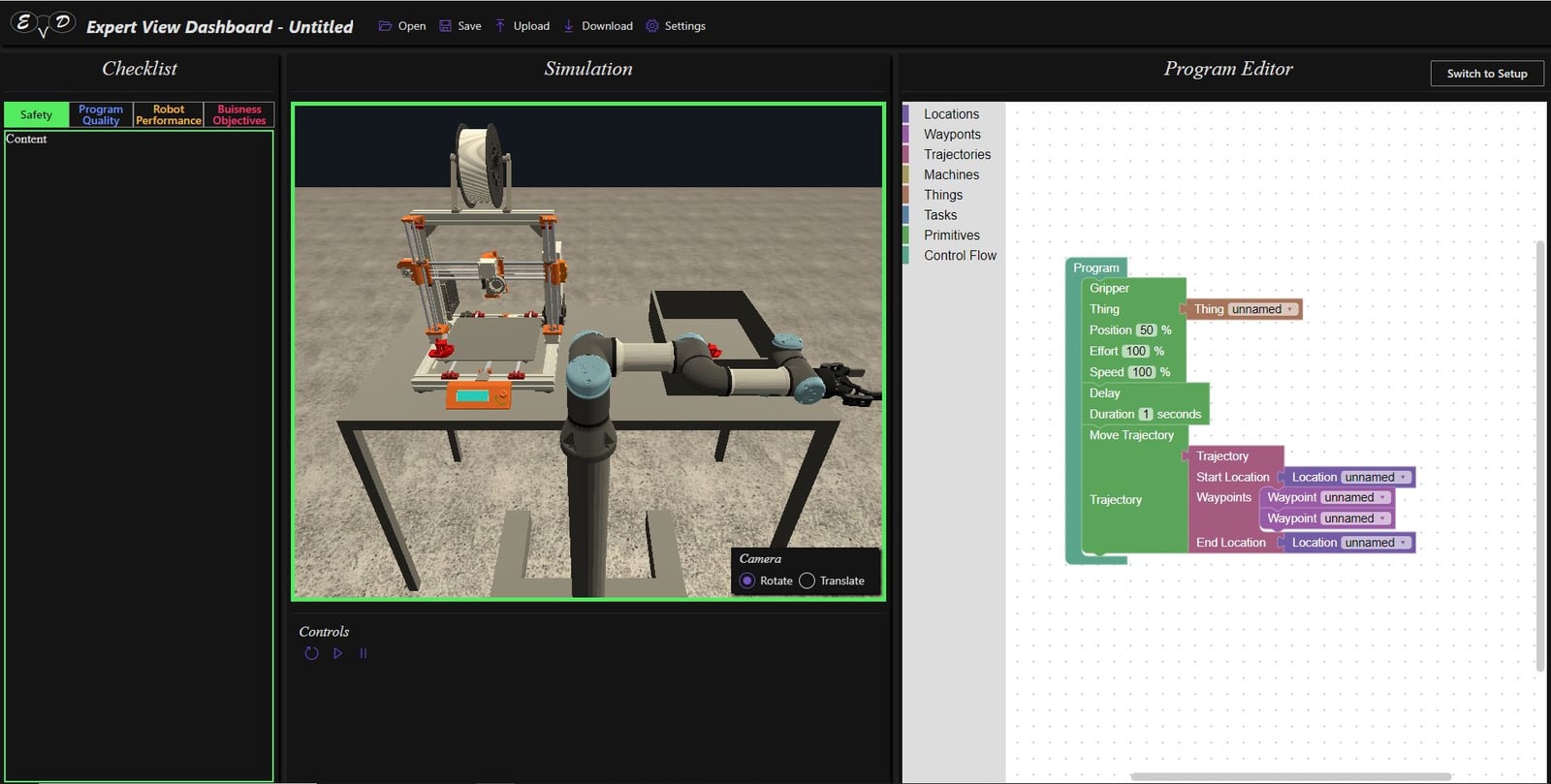
Coming out of that pivot, the original web app was conceptualized as a programming-only window. This design incorporated the expert feedback as control frames (on the left), a simulation view (in the center), a programming window (on the right), and a context dialog window (at the bottom). The general workflow and design was validated via feedback from experts and colleagues.
The application was developed using React and Microsoft Fluent framework. Simulation was designed to use the existing Unity project that had targeted Hololens. Both React and Unity communicated with the backend via ROS.
Several challenges still existed in the version one prototype. First the communication between Unity and React was clunky. Second, using Blockly ended up imposing suboptimal structure on EvDScript. Lastly, using React Contexts for communicating state between the various subsystems turned out to be rather underpowered.
The system has subsequently evolved after my hand-off to collaborators. I will discuss the changes in a later section.
After Graduation
I graduated from my masters program in May 2021. CoFrame at this point had gone through its first prototype iteration (after several pivots). I was transferring this project to my colleagues in the lab. Leading the next iteration was Andy, who I had collaborated with on Authr. We were still targeting the HRI paper deadline in October 2021.
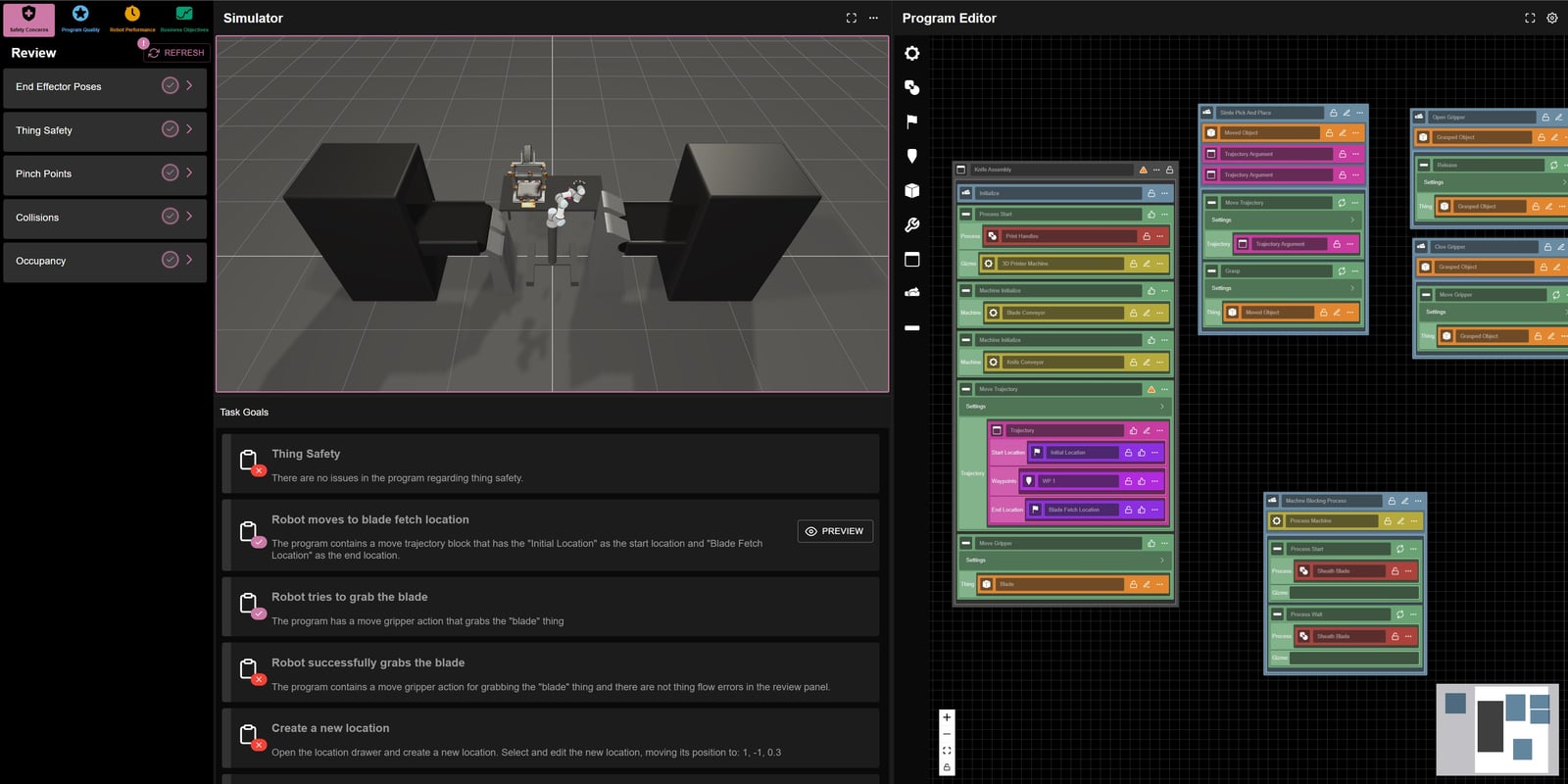
During the summer, while starting work at IDES, I first transferred the frontend system to Andy and Nate. They swapped out the Blockly system with a successor of the Authr task interface and swapped the simulation window from Unity to Three.js. Both of these technology changes addressed issues uncovered in the version one prototype. Minor point, the frontend framework was switched from Microsoft Fluent to Ant Design (in order to fit with the visual aesthetic of Andy's other applications). Lastly, React contexts were replaced with a Zustand state management system.
I continued work on the system backend, improving the EvDScript language and built out the pyBullet simulation for collision detection, proximity detection, pinch point analysis, and reach feasibility.
The end result is a system that at a high-level follows the original design but with significant polish.
With the system complete, I transferred the working paper draft to my colleagues (that I had kept from the start of the project). I took on more of an advisory role in the submission draft of the paper, focusing my efforts on the technical development and frame conceptualization.